Buying guide · 24 September 2026
How to Choose Distribution Software for a Small Wholesaler
A buying checklist for a small wholesaler: daily sales, stock, credit, currency, the real price, and a trial you can finish. Skip modules you will not use.
Small wholesalers do not need a full ERP on day one. They need distribution software for a small business that covers invoices, stock, and who owes money — without a dedicated IT team.
Use this checklist when you compare tools, including distribution management software like ProDistro.
1. Day-one sales and stock in one place
If creating an invoice does not reduce stock and (for credit) raise a customer balance, you will still need Excel beside the “new” system.
2. Credit that matches reality
Small wholesalers live on partial payments. Ask how overdue lists and statements work before you buy a tool built only for cash retail.
3. Currency and country fit
Pick software that can show amounts in the currency you trade. Pakistan teams may want local guides; Gulf, US, UK, and India shops need the same workflows in AED, USD, GBP, or INR.
4. Honest pricing you can start with
Look for a simple monthly (or longer) package and a trial. Avoid quotes that only make sense after a six-month implementation project you cannot staff.
5. A migration path from Excel
You need a cutover plan for products, customers, and opening balances — not a promise that history will magically tidy itself.
Compare Excel vs dedicated tools on Excel vs distribution software. See how shops in different regions would run the same product in our case studies and world examples. When you are ready, open pricing or start a free trial.
What should a small wholesaler test on the first day?
A small wholesale shop does not need a warehouse module, a payroll module, and a forecast on the first afternoon. It needs one loop that matches how the counter already works. Pick one product you buy in a carton and sell in pieces, one customer who pays in parts, and one supplier bill from this month. Receive the bill so stock goes up. Invoice the customer on credit so stock goes down and the customer’s balance goes up. Enter the part payment and read the remaining balance. If those three numbers agree with the carton, the invoice, and the cash you actually took, the tool can run the shop. If the vendor changes the demo to a cash retail sale, ask for the credit version again. Credit is the business.
While you do that, watch who is typing. The owner can approve the product. The person who writes invoices has to finish the sale and the receipt without a coach. If they cannot, the feature list does not matter. Also set the company currency before the first transaction. In ProDistro you can change it until that first sale or purchase, and then it stays, because old amounts are not converted. A Pakistani book should show rupees if the invoices are in rupees. The public price of the subscription is in US dollars. Those are different facts.
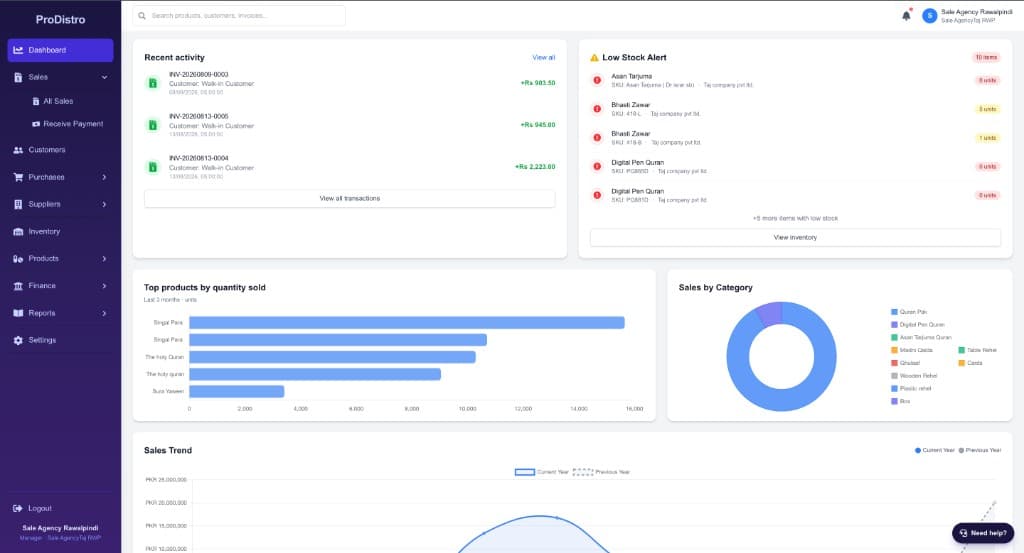
Ignore charts until the loop is boring. A dashboard that looks busy on sample data does not tell you whether your own product name, your own pack size, and your own partial payment will land in the right place. Ask to use your names. A slideshow of another industry is not a trial.
Which screens have to agree with each other?
Stock, the customer balance, and the supplier bill are one day of work. They should not live in three files. After the sample sale, the on-hand quantity should have moved only by the units you invoiced. The outstanding balance should equal the invoice minus the payment you posted, not a typed total. The supplier side should still show what you owe on the bill you entered, until you record a payment against it. If any one of those is a separate spreadsheet “for now,” you have not left the problem you are trying to leave.
Ask what happens when someone deletes an invoice, and whose login can do it. A shared password means you cannot answer that question later. Ask how you export products, customers, and balances if you leave. You want a straight answer, not a promise that export will exist next quarter. Ask whether medicine batches are a switch you turn on, or a different product you must buy. Do not pay for a pharma profile you will never use, and do not skip it if you sell medicine.
What can wait until the second month?
History can wait. Importing five years of invoices before the counter can post today’s sale is how cutovers stall. Keep the old workbook as a read-only archive. Opening quantities and opening balances are enough to start, and they should be numbers you have agreed, not a copy of a column nobody trusts. Area reports, staff targets, and extra print formats can wait until the daily sale, the stock figure, and the collection list are the ones people actually open.
Price is part of the test, not a footnote. ProDistro’s plans are $10 a month, $60 for six months, or $100 a year, in US dollars, and they renew until you cancel. A 14-day trial is there if you want the same screens before a card charge. Write down who is allowed to cancel and the date the period ends. A tool the owner cannot log into after the salesperson leaves is not a system you own.
Two vendors that both finish the credit-sale script should be separated by whether your own counter person finished it. Continue with distribution management software and the Excel cutover checklist.
What should you write down during the trial?
Take notes a colleague can read the next morning. Did the credit sale reduce stock by the pieces on the invoice. Did the partial payment reduce the balance by that amount only. Did the currency on the invoice match the currency you sell in. Who could delete the invoice. How you would export the customer list. Those five answers are the comparison. A vendor who cannot finish them in your product names is not ahead of one who can, no matter how long the feature grid is.
Also write what you will not use. If you do not run routes, do not reject a tool for a missing route map. If you do not sell medicine, do not require batch screens. If you do sell medicine, do not accept a later promise that batches can be added. The trial is the time to see the field on a purchase, not the time to collect slide titles. A module you turn on “just in case” becomes a screen your staff skip, and skipped screens are where stock and balances go to disagree.
End the trial with one decision: the counter person will post tomorrow’s sales here, or they will not. If they will, set the stop date for the spreadsheet and keep the archive file read-only. If they will not, say why in one sentence — pack size, receipt posting, or a balance they could not explain — and only then look at another product. Switching because the dashboard looked cleaner is how shops end up with two half-used logins and the real book still in Excel.
Bring one real supplier bill to that decision, not a sample item named “product.” If the bill’s carton does not become the pieces you sell, you have not tested the shop you run. Write the pack size you used next to the bill so the person who posts tomorrow uses the same number.