Features

Distribution Management Software for Wholesalers

ProDistro covers the daily work of distribution: selling, stocking, collecting from customers, paying suppliers, and seeing what needs attention — without a heavy ERP.

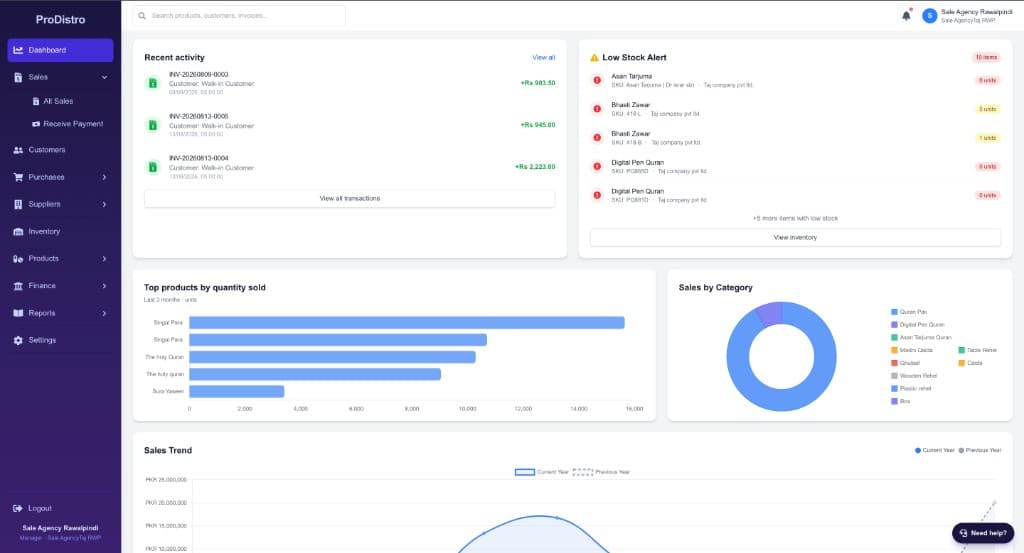
ProDistro dashboard showing recent invoices, a low-stock list, and sales charts
Dashboard from a live workspace: recent invoices, low stock, and sales.

Sales and Invoicing

Create invoices quickly and keep every customer bill organized.

  • Record cash and credit sales as they happen on the counter or in the field.
  • Generate clear invoices customers can understand and settle against.
  • Look up past sales by customer, date, or invoice without digging through registers.

Inventory Management

Know what is in stock, what is running low, and what to reorder.

  • Track product quantities as sales and purchases update stock automatically.
  • Spot low-stock items before you run out on busy order days.
  • Keep unit and box quantities clear so warehouse and sales stay aligned.

Customer Receivables

See who owes you, how much is overdue, and follow up faster.

  • View outstanding balances by customer in one collection-friendly list.
  • Open a customer statement with invoices and payments in order.
  • Send WhatsApp payment reminders with the amount already prepared.

Purchase Management

Record supplier purchases and keep buying history clear.

  • Log supplier bills with products, quantities, and costs.
  • Track what you owe suppliers separately from customer receivables.
  • Connect purchases to stock so inventory stays accurate after goods arrive.

Cash and Bank

Track money as it moves in and out of the business.

  • Record receipts and payments against cash or bank accounts.
  • See balances update as sales collections and supplier payments post.
  • Reduce guesswork about how much cash is actually available today.

Business Dashboard

Start the day with sales, outstanding balances, and items that need attention.

  • Check today’s sales and open receivables at a glance.
  • See low-stock and overdue collection cues before they become problems.
  • Jump from the dashboard into the exact sale, customer, or product that needs action.

Ask ProDistro

AI-assisted insights in plain language — restock, collect, top areas, overdue.

  • Ask which products need restocking and what to reorder first.
  • Ask who to collect from first based on overdue balances.
  • Ask about top areas, slow movers, and what needs attention today.

Try Ask ProDistro

Chat-style AI-assisted insights for restocking, collections, top areas, and more. Full examples and FAQs on the Ask ProDistro page.

Ask ProDistro

Ask your distribution data anything

AI-assisted insights from sales, stock, and receivables. Preview uses sample data so you can see the questions wholesalers ask.

Which products need restocking?

Ask ProDistro

Your top products running low (sample preview):

1. Paracetamol 500mg strips — about 12 days of cover left

2. Notebook A4 (box of 40) — about 18 days of cover left

3. Cooking oil 1L — about 9 days of cover left

Recommended reorder focus: ~450 units across these SKUs, starting with the shortest cover.

See all Ask ProDistro examples — restocking, collections, top areas, slow movers, and more.

Built around how distributors actually work

Beyond core modules, ProDistro focuses on the follow-through that keeps cash and stock under control.

Collection follow-ups

Use the receivables center to prioritize overdue customers and message them on WhatsApp without leaving ProDistro.

Faster lookups

Find invoices, customers, and products quickly so staff spend less time searching notebooks and Excel sheets.

Daily operating record

Keep sales, stock, and payment activity in one system so month-end is not a scramble of scattered files.

Pharma and medicine distribution

Medicine wholesalers can track stock by batch and expiry, allocate sales with FEFO, and manage credit customers — without forcing those fields on every shop type. See the dedicated page for pharmaceutical distributor workflows.

Pharma distribution software

See these features with your own products and customers

Book a free demo and we will walk through sales, stock, receivables, and purchases using a distribution workflow that matches your business.

Book a Free Demo